In The Name of Search

Where awesomeness is brewed right from the source!!!

STOP 114A

Know your rights and fight together for internet freedom

Help Sathiskumar a/l Tamilvanan!!! He has been reported missing over a week!!!

Do respond to the following contacts if noticed anything!!!

MoMobile :: Infinite Mobile Action

Subscribe to MoMobile and stay up-to-date with your gadget and gizmos!

Fantasy Football fever is back !!! Got a team yet?

Join us in the most exciting premiership league specially brought to you by Barclays. Register now and get your game ON!!!

Showing posts with label IT. Show all posts

Thursday, 11 August 2016

Digital Forensic - Autopsy(The Sleuth Kit) - Installing and Setup

Digital Forensics have come to prominent play in Malaysia. More cases in the court are requiring digital evidence to help solve and judge cases. Starting from petty theft, divorces and murders are now requiring the help digital forensic investigators to unravel many mysteries. This is the the right time for anyone interested in Information Technology industry and investigation to jump into this field.

There are already many blogs that already talks about basic digital forensic; I will not be going into the basics of it. This post is basically is my learning process of some of digital forensic tools. I have learned from the community, so I thought its only better if I share my experiences with the people. There will be series of post regarding the tools.

I will start with a digital forensic tool called Autopsy®. Autopsy was previously known or still known as the The Sleuth Kit. It started of as command line tool in linux operating system. The designed the GUI and all this while, it remained as linux tool. Couple of years back, they introduced Autopsy; it was for the windows operating system.

Autopsy has always remained open source and its free to use. You can download Autopsy from here. At the time of writing this article, the Autopsy was version 4.1.0. Autopsy has a lot of features, please visit this link to know more about its feature. I highly recommend you to download the 64-bit version as it offers better speed in analyzing the case.

At this point, I assume you have already downloaded. Below will be the screenshots of installation.

This the welcome screen for the Autopsy Installation

This is the default location of the installation, please feel free to change based on your preference.

Well, it can't get easier than easy. Press Install.

It will take two to three minutes to complete the installation.

Once the installation is completed, click the finish button.

A shortcut with man's best friend should be created on your desktop.

Assuming this is your first time using Autopsy, you may click "Create New Case"

This screen will help you to name your case and select the base directory to save all you cases.

Here, I am using a sample case, I have selected my base directory, please take note at the bottom, it automatically creates a folder based on your case name.

You can provide the case number and the examiner name.
To work with the same image I am using, please click this link to download. The image provided is an EnCase image (WinXP2.E01). This image was not prepared by me. It was taken from another site. It's from www.forensickb.com. It's a great blog for all digital forensic enthusiast. Please feel free to visit their site. In my next article, I will provide the scenario and other related materials for the case. Let's continue with our case setup.

Adding the data source for the case - Figure 11
Refer to Figure 11 - Please navigate to the EnCase image file that you downloaded and select it. At the select data source type, there will be few options to select from, 1. "Image or VM File" 2. "Local Disk" and 3. "Logical Files". Local Disk refers to any attached hard drive to the current workstation and Logical Files refers to any folders or files. In our case, it will be the first option.

Selecting the Ingest Module - Figure 12
Refer to Figure 12 - Autopsy comes with native ingest modules that we can select, for the autopsy to process our image. In the image above, I did not select the Android Analyzer as it is not relevant to our image file.

The Autopsy work space after adding the data source - Figure 13 
Refer to Figure 13 - Once you click next, you will arrive here. This is our work space. I will explain in detail in our next article.

I hope this article will be helpful for those who are just starting your journey into digital forensic. I would like to end this article with a quote from Bruce Lee - "A goal is not always meant to be reached, it often serves simply as something to aim at."


Friday, 20 March 2015

Create Your Own Online Proxy Server for FREE

You can deploy a proxy server with google app engine in a few minutes, without have to worry about the technical knowledge. This will be helpful to access blocked sites at workplace and schools. Have Fun!

How to Create Your Own Proxy Server ?

Step 1 : Open appengine.google.com and login in with your google account.

Step 2 : Click the “Create an Application” button. If this is your first time then Google may ask to verify code via sms to your mobile phone number.

Step 3: Select an Application Identifier and it will become the sub-domain of  proxy server. Give a title (say My Proxy Server) to your app, set the Authentication Option “Open to all users”, create the application.

Step 4: Go to python.org, download the 2.7 Installer and install Python. If you are using Mac, Python 2.7 is already installed on your computer.

Step 5: Download the application files required to create a proxy server from here . Extract the zip file on your desktop. You may edit the “main.html” file , to customize the front end of your proxy server.

Step 6: Go to code.google.com, download the “Google App Engine SDK for Python” and install it. When the installation has finished, click “Run Launcher” button.

Step 7: Inside the Google App Engine Launcher, Select Edit >> Preferences from the desktop and set the correct values for the Python Path, App Engine SDK and the Text Editor (set this is as WordPad or write.exe and not notepad.exe).


Step 8:  Click File tab >> Add Existing Application under the Google App Launcher program and browse to the folder that contains the files that you extracted in Step 5. Once the project is added to App Engine, select the project and click Edit to replace “YOUR_APP_ID” with your App ID (Sub-Domain you created in Step 3). Save and close the file.

Step 9:  Hit Deploy, enter your Google account credentials and, within few seconds, your online proxy server will be deployed. The public URL (or web address) of your new proxy server will be your _app_id.appspot.com (replace _app_id with your App Engine Identifier).

(Note: The generated proxy server is basic one therefore it willl not be functional for the sites which require logins, like gmail.)


Friday, 13 July 2012

The OSI Model Demystified

The Open System Interconnection model or normally known as the OSI model is one of the important topics in networking classes. The OSI model is the back bone of networking. All the protocols and connecting is made of OSI layers. This particular subjects seems to be a pain in the ass for the most of the students and they do not practice using the layers in the OSI model. Since the basics of their networking is not so strong, they tend to flip in their networking career. Here is my Advice for networking students PLEASE REMEMBER OSI MODEL. You guys will be using it the entire networking career.

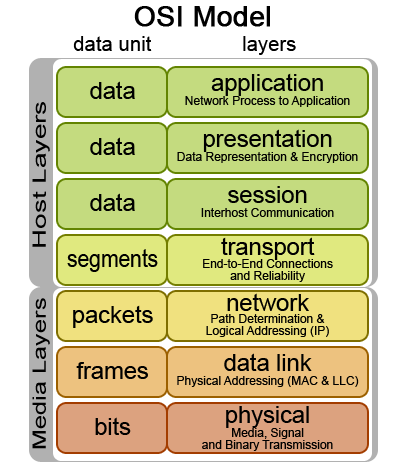
Let's get it started. OSI model consist of 7 layers. Application layer, presentation layer, session layer, transport layer, network layer, data link layer and physical layer. If you find it hard to remember those layers, do not worry as you keep practicing you should be able remember it. I normally use a sentence to remember the OSI layers - 'Please Do Not Trust Sales Person Always'. So, in this way I would not forget the OSI layers. Knowing the layers does not make you look good but you need to know the content of the each layer.

The Seven Layers of OSI Model

Before we jump into the layers, you guys need to know about Protocol Data Unit (PDU). Think of PDU like when some asks you what is your weight? and you answer 65 Kg. So, in this case PDU will be Kg. In the OSI model as the information travels through the layers it will take different forms. To address the different form of information we use PDU. OSI model has 3 approaches-1. Top to Bottom 2. Bottom to Top 3. Divide and Rule. It does not what is your approach as long you understand the layers. In this article I will take the Top to Bottom approach.

Application Layer
This the layer where the human interacts with the computer to send or receive something.In this layer we have networking applications like web browser and email,i.e. Firefox, Google Chrome, Safari, Internet Explorer, Gmail, Yahoo Mail etc. Basically in this layer your computer receives information from user or displays information for the user, thus the PDU in this layer is User Data.

Presentation Layer
This layer helps to convert the user data into computer readable format. In this layer, you will have your user data converted, encrypted and compressed. Who makes it all possible is your Operating System (OS). Your OS is sandwiched between your hardware and software. How does your word processor i.e. Microsoft Word know what are you typing and displays on the screen? This is all possible because the converting process is done by your OS. To help your remember what happens in this layer think of OS and what is does. PDU in this layer is Formatted Data.

Session Layer
Session layer helps to establish, maintain and terminate communication with the other networking device. There are three types of session.
1. Simplex - Think of keyboard (Sends or Transmits) and monitor (Receives) its a one way communication.
2. Half-Duplex- Think of walkie-talkie where both also can act as transmitter and receiver but one has to wait to transmit or receive until the other side has finished talking or receiving.
3. Full-Duplex - Think of telephone, you can speak and listen at the same time. One can be transmitter and receiver at the same time.
PDU in this layer is still Formatted Data as no changes occurs to the data.

Transport Layer
The big chunk of formatted data will be received from session layer. The formatted data will be cut into few parts of small pieces. We call that segmentation. In a nut shell this layer breaks up the data from the sending host and then reassembles in the receiving host. PDU in this layer is Segments.

Network Layer
Network layer also known as layer and sometimes as 'Cisco Layer'. The device in this layer is router. So, basically if you know what is the function of a router, you will be able to explain this layer without problem. Segments will be received from transport layer and encapsulated. Think of encapsulation as putting a bread into a container. The same way the segments are put into packets and its called encapsulation. In this layer also we have, packet forwarding, packet filtering, Determines best path to send the packets (OSPF) and inter-network communication. PDU in this layer is Packets.

Data Link Layer
Data Link layer receives the packets from network layer. This layer consists of switch,network interface card (NIC) and ethernet port. If you know what is the function and use of each of the device, then data link layer shouldn't be a problem. Performs a physical addressing. The physical address is got from the NIC. So, if you know the use of the device you will be able to explain this layer. Logical Link Control (LLC) performs link  establishment (switch) and Access to media using MAC address. Here the packets will be put into frames. The next layer is the physical layer and physical layer can only understand bits. So, data link layer turns frames ===>bytes===>bits while sending to physical layer and changes vice-versa  when receiving from physical layer. Here we say, the data is transferred bits by bits to physical layer. PDU is Frames.

Physical Layer 
Physical layer receives the data from data link layer bits by bits. The device present in this layer is cables. The job of the this layer is move bits between the device. PDU in this layer is Bits.


That is all about OSI Model. Learn it and know it by heart and I am sure it will be worth full.
Please feel free to ask me any question regarding the OSI  model. I will be more than happy to help you out.Cheers.

Tuesday, 13 March 2012

An insight on KONY 2012 - Learn the Truth Now

Recently we have been hit by social network campaign by Invisible Children Inc. Their campaign was to make Joseph Kony famous thus bringing him to the face of justice for his war crimes. To the readers of freemahesa, we support to stop Joseph Kony and bring him to the faces of justice. What we don't support his the methods proposed by the Invisible Children Inc. that is by American army intervention thus enforcing the Uganda People's Defense Front (UPDF). Joseph Kony was the Leader of Lord's Resistance Army (LRA).

We do not say that you should not support this campaign but do some research and learn the truth before you donate. Please assure where your money goes. It is surprising that a charitable orgainsation has 'Inc.' after its name and we strongly suspect the US government for showing special interest after oil was found in Uganda.

Dear Readers, do not believe what you see and hear. Please do your research.  I have posted few links and video for you to start your research. I am sorry for I am not able to summarize it for you. I will do it when I have the time.  Be an informed Community. 

Youtube Videos

Uganda's outrage over the Kony 2012 Video:
http://www.telegraph.co.uk/news/worldnews/africaandindianocean/uganda/9131469...

"Don't Wag the Dog"
http://emergingcritic.wordpress.com/2012/03/09/kony-2012-dont-wag-the-dog/

According To Invisible Childrens own Financial records, it show a maximun of 32% of donations going to the children.. Thats a maximum.. but thanks to their refusal of audits that number cant be confirmed as a top number. could be 1% or 12%. who knows...

Sources:

1. Invisible Children Financial Report (2011) (Page 6 for expenses)
http://www.youtube.com/redirect?q=http%3A%2F%2Fc2052482.r82.cf0.rackcdn.com%2...

2. Charity Navigator Rating
http://www.charitynavigator.org/index.cfm?bay=search.summary&orgid=12429

3. Invisible Children Founders posing with Sudan's People's Liberation Army
http://www.washingtonpost.com/blogs/blogpost/post/invisible-children-founders...

4. Rape and looting linked to Ugandan soldiers
http://www.observer.ug/index.php?option=com_content&view=article&id=1...

5. Manipulation of facts (Foreign Affairs report)
http://www.foreignaffairs.com/articles/136673/mareike-schomerus-tim-allen-and...

6. US intervention in Uganda
http://chrisblattman.com/2011/11/21/what-you-should-be-reading-if-you-want-to...

7. Sudan Army's usage of child soldiers
http://www.sudantribune.com/SPLA-to-demobilize-all-child,36125
http://www.bbc.co.uk/news/world-africa-11135426

8. Quotes from BBB, etc
http://www.ktvb.com/news/consumer/What-is-KONY-2012-141987213.html

9. B.B.B review
http://www.bbb.org/charity-reviews/national/children-and-youth/invisible-chil...

10. Explosure Blog
http://blog.joerenken.com/2012/03/07/invisible-children-and-kony-2012-exposed/

11. Kony Flee Uganda
http://ssuubifm.net/kay/2012/02/konys-lra-hostage-starving-as-militants-flee/

12. Invisible Children And Kony 2012 Exposed
http://blog.joerenken.com/2012/03/07/invisible-children-and-kony-2012-exposed/
http://pastebin.com/Ku2Hw7W0
http://www.blackstarnews.com/news/122/ARTICLE/6586/2010-06-02.html

                                    Learn The Truth.

Wednesday, 16 November 2011

Facebook Fan Page: World of Lolz

LOL has been rated as the most used word on internet. The supposedly meaning of LOL would be Laughing Out Loud. As revolution began on the internet. LOL took many faces, P.O.V. and variations. Some of the variations would be LMAO (Laughing My Ass Out), LMFAO (Laughing My F***ing Ass Out), and so on. There was also this iPhone joke or the facebook father's status joke, where they misunderstood the abbreviation for Lots Of Love. Well, that's a bit of introduction to LOL.

So, talking about LOL - my friend came with the idea of facebook fan page. Its gaining its popularity now. It can be said one of the upcoming successful superstar page. I believe everyone should know about this, after all laughter is the best medicine and its free for all. Sorry to keep you guys with elaboration. Its the one and only 'World of Lolz'.

Before I talk more on the fan page. Let me say few words about the founder and a friend of mine. His name is Syafiq and he is tall. Not just any tall he is freaking tall. You can see him along USM main gate doing flash mobs wearing his hollow masks and he his blur during holidays. Okay, there is more like fun facts, was it? LOL. He is a pharmacy student in USM. Since he SMS-ed me the full name Ahmad Syafiq bin Ahmad Izani.
Syafiq aka Flash Mob Specialist
He said Shah Rukh Khan is not the only one who is handsome
p/s: I am not very sure of the theory

The Other Admin of World of Lolz: Wong Hon Kit (Nuttela Warrior). Something for readers: Syafiq sent me the facts and I chose the most relevant fact about Hon Kit, loves Nutella,LOL.Okay, hard facts, from Perak, Pharmacy student from USM. Awesome in English and Bahasa Melayu.
Wong Hon Kit aka Nutella Warrior
Sorry for the paparazi shot
p/s: this is not his real picture

Official Logo of World of Lolz
p/s: the kitten was not harmed in the process of photoshop
The Happy Moments of World of Lolz

We have a lot pages in the facebook but whats different about them. You feel you're at home. Everybody understands the jokes and its Malaysian style. Maybe I should say the one and only 1 Malaysia fan page for jokes. The admins are very committed, I mean they don't get paid but they love what they doing and others are happy. I see daily updates, even sometime hourly updates.

One of the best part is, the fans love to share what they find funny in the net on World of Lolz. I respect the admins for creating such atmosphere at the page for greater communications among everybody. Sharing is Caring though.

At first, I thought its gonna be just like another joke site, but the admins proved how wrong I was when they always had their David Blaine's tricks up their sleeves.

Some of the Jokes and Quotes from World of Lolz.


1. Math is the only place where I hear a person buying 60 watermelons.


2. Carbon dioxide is killing the planet. Please stop breathing. Thanks


3. Almost went to jail today, scared the shit out of me.
     Yeah, those monopoly games get pretty intense!

4. Saw a Chinese kid and a black kid wave to each other today. 
     It gave me hope... for another Rush Hour movie.

5. That awkward moment when you finish a math problem and your answer isn't even one of the choices.


You want more of it. Go ahead and Click Here. You will love them too.

All of my friends, love it. I think you guys will like it too. No harm caused during the visit of the facebook fan page. So no worries of medical fees. Its free and always will be free.

Laughter the Best Medicine - World of Lolz

Monday, 17 October 2011

DiGi iPhone 4 Promotion - As low as RM43/month

Yes! Its not joke and its for real. I was surprised. I think currently that is the lowest monthly payment offered for iPhone in Malaysia is RM 43/month. I think it is a good offer. Those people who are crazy about iPhones and not being able to own one. Here is your chance now. Only by Digi the Smarter Choice.

The picture above says all you need to know. Find out more by visiting DiGi - Always the Smarter Choice.

Friday, 7 October 2011

Tech Leaders and Journalists/Bloggers' Reactions to the Death of Steve Jobs


Note: In many cases, these are not the entire statements. Many had paragraphs more to say about Jobs. You could fill a very large book or perhaps a set of encyclopedias to really get it it all in there.
1. The Jobs family: “In his public life, Steve was known as a visionary; in his private life, he cherished his family. We are thankful to the many people who have shared their wishes and prayers during the last year of Steve’s illness.”
2. Apple Co-founder Steve Wozniak: “It’s like the world lost a John Lennon – I mean Steve was clearly the most outstanding business thinker and almost everybody high up in the technology business recognized that somehow he had the ability to think out new ways of doing things, not just ways to improve what we have (do a better version of something) but do it in a totally different way that the world would swing towards.”
3. Apple CEO Tim Cook: “Apple has lost a visionary and creative genius, and the world has lost an amazing human being.”
4. Apple’s Board of Directors: “Steve’s brilliance, passion and energy were the source of countless innovations that enrich and improve all of our lives. The world is immeasurably better because of Steve.”
5. Pixar Chief Creative Officer John Lasseter: “He saw the potential of what Pixar could be before the rest of us, and beyond what anyone ever imagined. Steve took a chance on us and believed in our crazy dream of making computer animated films; the one thing he always said was to simply ‘make it great.’”
6. Walt Disney President Bob Iger: “Steve was such an ‘original,’ with a thoroughly creative, imaginative mind that defined an era. Despite all he accomplished, it feels like he was just getting started.”
7. Microsoft co-founder Bill Gates: “Steve and I first met nearly 30 years ago, and have been colleagues, competitors and friends over the course of more than half our lives. The world rarely sees someone who has had the profound impact Steve has had, the effects of which will be felt for many generations to come.”
8. Microsoft co-founder Paul Allen: “We’ve lost a unique tech pioneer and auteur who knew how to make amazingly great products. Steve fought a long battle against tough odds in a very brave way. He kept doing amazing things in the face of all that adversity. As someone who has had his own medical challenges, I couldn’t help but be encouraged by how he persevered.”
9. Microsoft CEO Steve Ballmer: “I want to express my deepest condolences at the passing of Steve Jobs, one of the founders of our industry and a true visionary. My heart goes out to his family, everyone at Apple and everyone who has been touched by his work.”
10. Yahoo co-founder Jerry Yang: “Steve was my hero growing up. He not only gave me a lot of personal advice and encouragement, he showed all of us how innovation can change lives. I will miss him dearly, as will the world.”
11. Google CEO Larry Page: “He was a great man with incredible achievements and amazing brilliance. He always seemed to be able to say in very few words what you actually should have been thinking before you thought it. His focus on the user experience above all else has always been an inspiration to me.”
12. Google co-founder Sergey Brin: “From the earliest days of Google, whenever Larry and I sought inspiration for vision and leadership, we needed to look no farther than Cupertino. Steve, your passion for excellence is felt by anyone who has ever touched an Apple product (including the macbook I am writing this on right now). And I have witnessed it in person the few times we have met.”
13. Google Executive Chairman Eric Schmidt: ““Today is very sad for all of us. Steve defined a generation of style and technology that’s unlikely to be matched again. Steve was so charismatically brilliant that he inspired people to do the impossible, and he will be remembered as the greatest computer innovator in history.”
14. Google Research Director Peter Norvig: “Honor Steve Jobs: resolve to do something insanely great.”
15. Google head of web spam Matt Cutts: “The tech industry lost an amazing, world-changing person today. Rest in peace, Steve.”
16. Facebook CEO Mark Zuckerberg: “Steve, thank you for being a mentor and a friend. Thanks for showing that what you build can change the world. I will miss you.”
17. Dell CEO Michael Dell: ” The legacy of Steve Jobs will be remembered for generations to come.”
18. Serial entrepreneur Bill Gross: “Steve Jobs is in 6.36% of EVERY Tweet in the world right now, 50% of my Google+ stream, and in 100% of our thoughts. #HeMadeTheWorldABetterPlace”
19. Nokia CEO Stephen Elop: “Steve’s passion for simplicity and elegance leaves us all a legacy that will endure for generations.”
20. Twitter CEO Dick Costolo: “”Once in a rare while, somebody comes along who doesnt just raise the bar, they create an entirely new standard of measurement. #RIPSteveJobs”
21. Twitter/Square co-founder Jack Dorsey: “Rest in peace, Steve Jobs. Your genius will live on for generations to come…”
22. Foursquare CEO Dennis Crowley: “”
23. Sean Parker of Facebook, Napster, Plaxo, Spotfiy, etc.: “Steve Jobs was the most important technology leader of our era—perhaps even the most important business leader of our era. He was also a unique figure in the world of business and technology, a man who demonstrated—more so than any other—that pure force of will, energy, and creative drive can change the world for the better.”
24. Virgin Chairman Richard Branson: “He was a truly great businessman but more than that he was an inspiration to young people, entrepreneurs, inventors, designers, early adopters, budding musicians, and people with disabilities who discovered with Apple’s devices a way to engage with the world.”
25. AOL co-founder Steve Case: “”I feel honored to have known Steve Jobs. He was the most innovative entrepreneur of our generation. His legacy will live on for the ages.”
26. Salesforce CEO Mac Benioff: “”Steve Jobs was the greatest leader our industry has ever known. We are all blessed by his life. My thoughts and prayers are with his family.”
27. Sony CEO Howard Stringer: “The digital age has lost its leading light, but Steve’s innovation and creativity will inspire dreamers and thinkers for generations.”
28. iEntry CEO and WebProNews Founder Rich Ord: “A sad day for America. Steve Jobs was our generation’s Thomas Edison.”
29. Journalism industry voice Jeff Jarvis: “We have lost our Gutenberg, Edison, Picasso, Carnegie….”
30. O’Reilly Media Founder Tim O’Reilly: “May the uncompromising vision of Steve Jobs live on, inspiring others, making them reach further, do better.”
31. Technologizer Founder Harry McCracken: “Pixar alone would have been a dazzling legacy.”
32. Demand Media CEO Richard Rosenblatt: “I am sad; just teared up when I heard steve jobs died; a true inspiration and the CEO I admired most with no real number 2. Farewell.”
33. Mark Cenedella, Founder of The Ladders: “We’ve lost our Jobs. Life / swipes by, fingerprints reveal: / He adopted us. #ThankYouSteve”
34. Search Engine Land Editor-in-Chief Danny Sullivan: “Me to boys: Did you hear about Steve Jobs. Yes. What do you think about that? ‘It’s sad because he has four kids.’ Kids always bring it home.”
35. Mashable Founder Pete Cashmore: “‘Your time is limited, so don’t waste it living someone else’s life.’ — Steve Jobs”
36. Mashable editor Ben Parr: “You were the force behind multiple computing revolutions. You created a company that changed how we interact with the world. And for good measure, you created on[e] that changed the face of entertainment.”
37. Wall Street Journal tech columnist Walt Mossberg: “He did what a CEO should: Hired and inspired great people; managed for the long term, not the quarter or the short-term stock price; made big bets and took big risks.”
38. GigaOm founder Om Malik: “Every generation has its heroes. I was too provincial to love the Beatles and cry over John Lennon. I was too Indian to care much about Elvis. And I read about President Kennedy in books. But for me, Steve Jobs was all of those people. I don’t know why, how and where that happened but Jobs was my icon.”
39. TechCrunch founder Michael Arrington: “Damn. People like steve jobs are supposed to live forever.”
40. Tech influencer Robert Scoble: “I was driving on the freeway in Cupertino when I heard the news. Shocking. So much emotion is swirling about.”
41. Journalist Katie Couric: “Rest in peace, Steve Jobs. You’ve changed forever the world you leave behind.”
42. Film critic Roger Ebert: “I’m reading about the loss of Steve Jobs on the 17th Macintosh I’ve owned.”
43. Huffington Post Founder Ariana Huffington: “My thoughts go out to Steve Jobs’ family and friends. Thank you for changing our world.”
source:www.webpronews.com

Tuesday, 27 September 2011

How to Enable the New Facebook Timeline NOW


You've been hearing about all the wonderful new Facebook features, and like us, you’re probably super-eager to get started with them.
If you’re willing to go through a series of eight steps, you can get into the brand-new Facebook Timeline right now.
Simply follow the instructions below, and suddenly you’ll be basking in a new world of Facebook goodness, just like the developers are. Follow the instructions carefully, and good luck.
Please note: If you haven’t already verified your Facebook account with either a mobile phone number or credit card number, you’ll be asked to do so before you can try the new features. If you need more help with that,here’s a helpful link.
First, you’ll need to go to the Facebook developer page, which is a part of your Facebook account. Make sure you’re logged into your Facebook account, and then simply follow this link to get started.
Update: When will we be able to opt into the Timeline without the need for going through these developers’ steps? Says Stefan Parker, Facebook UI Engineer on Quora, “We are aiming to start letting users opt into Timeline in the next two to four weeks. There is no set date though.
Step 1: When you get here, click "allow".
Step 2: Click "Create New App"

Step 3: Name it whatever you want, and give it whatever namespace you'd like -- it doesn't matter. Click the checkbox "I agree to the platform privacy policy." And then click Continue, pass the security check by filling in the Captcha, and you'll be ready for the next step
Step 4: After you've verified yourself as a human, you'll reach this screen, where you'll need to click "Open Graph" on the left side.
Step 5: You'll see the next screen, entitled "Get Started with Open Graph" -- fill in anything you want (it doesn't matter) in those fields under the heading "start by defining one action than one object for your app." Click Get Started.
Step 6: On this screen, do nothing except scroll to the bottom and click "Save Changes and Next." Do the same thing on the next screen.
Step 7: You'll be taken to this screen. Wait a few minutes, and then go to your Facebook homepage. That's where you'll be invited to enable Timeline. Be patient at this point -- sometimes it requires you to wait before the changes take effect.
Step 8: When you go back to your Facebook homepage, you'll see this. Success! Click Get It Now, and you're in!
That's about it. Please use the timeline at your own discretion. Parental Advisory NOT required. Have Fun.

Monday, 26 September 2011

Will You Put Your Whole Life on Facebook With the Timeline Feature?

The Timeline feature Facebook is blowing a lot of people’s minds. “Tell the whole story of your life on a single page,” CEO Mark Zuckerberg said as he announced the feature.

That, in a nutshell, is what the timeline is all about. Sure, it will feature your recent Facebook activity, classic “wall” material, and app-related content. There’s a lot of cool stuff happening there, but the timeline itself goes back to when you were born, containing as much information as you want to share.
It looks like you can add content extending even before your birth (notice the +. You can drag that down and add more things, entering when something happened):

However, if you try to enter something for a date before your birthday, it doesn’t let you. It just tells you you weren’t born yet, which apparently eliminates pictures of your mom’s pregnancy, and any pictures of you as a fetus. Maybe they’ll enable this later.
Post birth, you pretty much have free reign.
You can add health-related events:


Other life events:


You can add content about when you lose a loved one:


The point is, you can pretty much add anything from your life starting with birth, which means a lot of people are going to be spending a whole lot of time adding things from their lives. Or at least that appears to be Facebook’s goal.
I have no reason to believe that tons of people won’t be adding everything they can think of to make their lives look more interesting than the next guy’s. You’re going to look pretty lame if you only have a few things and everyone else is climbing mountains, sky diving and meeting presidents.
Imagine the data. Imagine the ad targeting possibilities.
Imagine that Facebook is around for the long haul, and new people are born into the world where this is just the norm. It is a pretty interesting time indeed.
All of that said, some things you might be thinking include: I wonder how many people will get fired from their jobs. I wonder how many more divorces will get blamed on Facebook. I wonder how many lives will this ruin.
Don’t worry. “You have complete control over everything on your timeline. You have control of what’s there and you also control who can see everything,” said Zuckerberg during the keynote.
Well, users have had a lot of control over what they share on Facebook in the past, but that hasn’t stopped all of those things from happening. Tread carefully. By carefully, I mean with common sense. It may not be a good idea to post about the first time you used an illegal narcotic or the affair you had a few years ago. Not that you’ve done either of those things.

SOURCE: www.webpronews.com

Sunday, 25 September 2011

Google Tools - Google Docs

Google Docs are free online documents that can be accessed from anywhere, shared with your team and edited by invited collaborators.


What Types of Google Docs?
There are five types of documents you can create:
1.Word documents
2.Spreadsheets
3.Presentations
4.Drawings
5.Forms


Sharing & Full Access
After creating a document, you can share it with anyone who needs to view, edit or manage it.Once you are in the document, a share button in the upper right corner will allow you to edit the users who can have access. All you need to do is enter names/email addresses.

Scheduling & Efficiency
Google Docs helps you become efficient at calendaring and scheduling content.For instance, you can use Google spreadsheets to keep a running list of your blog post ideas and etc. In this way,you ensure everyone on the team is aware of your activities and can help out as necessary.


Content Creation & Collaboration
Google Docs helps with brainstorming new content ideas and collaborating within the actual creation process. Maintaining these docs, you can eliminate unnecessary meeting time and be more efficient.


Calendars & Meetings
Lastly, Google calendars also provide you with a helpful platform to stay organized, create reoccurring events and remember deadlines. At HubSpot, we even use them as a way to keep track of when our team members will be away from the office.


Go to Docs.Google.com
1) Select a content series (blog articles, webinars, videos, email).
2) Create a document around that content
3) Share document with co-workers.
4) Collaborate, modify and publish.